2017年9月29日 星期五

[GrapeCity][Spread Windows Forms] 錯誤 Task could not find "LC.exe" using the SdkToolsPath ""


錯誤訊息(Error):
Task could not find "LC.exe" using the SdkToolsPath "" or the registry key "HKEY_LOCAL_MACHINE\SOFTWARE\Microsoft\Microsoft SDKs\NETFXSDK\4.6.1\WinSDK-NetFx40Tools-x86". Make sure the SdkToolsPath is set and the tool exists in the correct processor specific location under the SdkToolsPath and that the Microsoft Windows SDK is installed xxx

解決方法:
這個狀況其實就是預設Spread一開所放置的是免費試用的版本
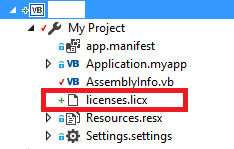
開新的專案(Project)要先手動直接刪除,再重新編譯就會再次自動產生有付費後的版本


[OFFICE2010][PowerPoint] 將PPT轉為網頁

PPT轉網頁方法
1.      請一個網頁一個PPT檔案
2.      PPT 中按下Alt+F11
接著在View選擇Immediate Window
3.      Immediate Window 輸入下面這串文字後直接Enter
※紅字為指定存檔位置,檔名切記不使用中文且不要有空白
ActivePresentation.SaveAs "D:\temp\Default.htm", ppSaveAsHTML, msoFalse
4.      轉出後會產生一個htm網頁檔與相同檔名資料夾,將這兩個檔案直接放置
Website資料夾中即可
5.      常見問題

þ有連結的請固定在前方加上紅字http://xxx.xxx.xxx/*****.htm

2017年8月25日 星期五

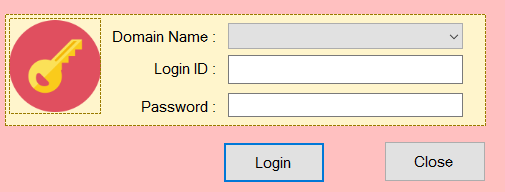
[Windows Forms] [VB.NET] 實現利用AD帳號登入Windows Form


我過去的設計都是走獨立SQL帳號密碼管理
但這次的需求是要利用走現有的AD認證,方便使用者不需要記多組帳號密碼


以下直接列出我的實作方式

1.先加入參考


2.直接開一個檔案為LdapAuthentication.vb
完整程式碼如下:

Imports System
Imports System.Text
Imports System.Collections
Imports System.DirectoryServices


Namespace FormsAuth
    Public Class LdapAuthentication

        Dim _path As String
        Dim _filterAttribute As String

        Public Sub New(ByVal path As String)
            _path = path
        End Sub

        Public Function IsAuthenticated(ByVal domain As String, ByVal username As String, ByVal pwd As String) As Boolean

            Dim domainAndUsername As String = domain & "\" & username
            Dim entry As DirectoryEntry = New DirectoryEntry(_path, domainAndUsername, pwd)

            Try
                'Bind to the native AdsObject to force authentication.
                Dim obj As Object = entry.NativeObject
                Dim search As DirectorySearcher = New DirectorySearcher(entry)

                search.Filter = "(SAMAccountName=" & username & ")"
                search.PropertiesToLoad.Add("cn")
                Dim result As SearchResult = search.FindOne()

                If (result Is Nothing) Then
                    Return False
                End If

                'Update the new path to the user in the directory.
                _path = result.Path
                _filterAttribute = CType(result.Properties("cn")(0), String)

            Catch ex As Exception
                Throw New Exception("Error authenticating user. " & ex.Message)
            End Try

            Return True
        End Function

        Public Function GetGroups() As String
            Dim search As DirectorySearcher = New DirectorySearcher(_path)
            search.Filter = "(cn=" & _filterAttribute & ")"
            search.PropertiesToLoad.Add("memberOf")
            Dim groupNames As StringBuilder = New StringBuilder()

            Try
                Dim result As SearchResult = search.FindOne()
                Dim propertyCount As Integer = result.Properties("memberOf").Count

                Dim dn As String
                Dim equalsIndex, commaIndex

                Dim propertyCounter As Integer

                For propertyCounter = 0 To propertyCount - 1
                    dn = CType(result.Properties("memberOf")(propertyCounter), String)

                    equalsIndex = dn.IndexOf("=", 1)
                    commaIndex = dn.IndexOf(",", 1)
                    If (equalsIndex = -1) Then
                        Return Nothing
                    End If

                    groupNames.Append(dn.Substring((equalsIndex + 1), (commaIndex - equalsIndex) - 1))
                    groupNames.Append("|")
                Next

            Catch ex As Exception
                Throw New Exception("Error obtaining group names. " & ex.Message)
            End Try

            Return groupNames.ToString()
        End Function
    End Class
End Namespace


3.Login按鈕

Sub Login_Click(sender as object,e as EventArgs) Handles btnLogin.Click

  Dim adPath as String = "LDAP://DC=..,DC=.." 'Path to your LDAP directory server

 'LDAP 輸入方式再請另外自己GOOGLE填寫方式

  Dim adAuth as LdapAuthentication = new LdapAuthentication(adPath)
  try
    if(true = adAuth.IsAuthenticated(txtDomain.Text, txtUsername.Text, txtPassword.Text)) then
      Dim groups as string = adAuth.GetGroups()

      'Create the ticket, and add the groups.
      Dim isCookiePersistent as boolean = chkPersist.Checked
      Dim authTicket as FormsAuthenticationTicket = new FormsAuthenticationTicket(1, _
           txtUsername.Text,DateTime.Now, DateTime.Now.AddMinutes(60), isCookiePersistent, groups)

      'Encrypt the ticket.
      Dim encryptedTicket as String = FormsAuthentication.Encrypt(authTicket)

      'Create a cookie, and then add the encrypted ticket to the cookie as data.
      Dim authCookie as HttpCookie = new HttpCookie(FormsAuthentication.FormsCookieName, encryptedTicket)

      if(isCookiePersistent = true) then
authCookie.Expires = authTicket.Expiration
      end if
      'Add the cookie to the outgoing cookies collection.
      Response.Cookies.Add(authCookie)

      'You can redirect now.
      Response.Redirect(FormsAuthentication.GetRedirectUrl(txtUsername.Text, false))
    
    else
      errorLabel.Text = "Authentication did not succeed. Check user name and password."
    end if

  catch ex as Exception
    errorLabel.Text = "Error authenticating. " & ex.Message
  end try
End sub


文章參考
 vb.net開發的login程式(win form),帳號要如何與AD帳號整合?
https://social.msdn.microsoft.com/Forums/zh-TW/5fe87afe-340a-41eb-bab4-a8707400a9a3/vbnetloginwin-formad?forum=232


如何使用表單驗證及 Visual Basic .NET 通過 Active Directory 驗證
https://support.microsoft.com/zh-tw/help/326340/how-to-authenticate-against-the-active-directory-by-using-forms-authen

2017年7月27日 星期四

[VB.Net] 程式自動建立捷徑到桌面上


If (Not File.Exists(String.Format("{0}\程式.lnk", My.Computer.FileSystem.SpecialDirectories.Desktop))) Then '檢查桌面
CreateShortCut("檔案位置", "程式.exe", "描述") '產生捷徑
End If


Sub CreateShortCut(ByRef strFolder As String, ByRef strExe As String, ByRef strName As String)
Dim sc, objWS As Object
objWS = CreateObject("WScript.Shell")
With objWS
sc = .CreateShortCut(.SpecialFolders("Desktop") & "\" & Replace(strExe, ".EXE", ".LNK", 1, , 1))
End With
With sc
.TargetPath = objWS.ExpandEnvironmentStrings(strFolder & "\" & strExe)
.WorkingDirectory = strFolder
.Description = strName
.WindowStyle = 4
.IconLocation = objWS.ExpandEnvironmentStrings(strFolder & "\" & strExe & ",0")
.Save()
End With
End Sub

2017年7月6日 星期四

[WINDOWS 10] [English Version]將預設輸入法切換改為 Ctrl + Shift


從控制台進入到語言設定
> Control Panel\Clock, Language, and Region\Language


從左側選擇進階選項
找到更換語言快速鍵


把切換輸入法改為Ctrl+Shift


OK囉!!

[設計好物]CANVA


推薦網站:https://www.canva.com/


這是線上免費設計卡片或者是一些平面小宣傳廣告用的(例如:Facebook)

裡面有些基本設計或者是收費的設計

最好用的地方是你可以自由設計後轉成圖片檔或者是PDF

轉出後的PDF還可以直接使用Illustrator去修改成自己需要的尺寸

而且在Illustrator中使用,每個頁面都是獨立的物件還可以做更廣泛的應用

真的是無敵好用!!!強力推薦 👍

[Windows Forms] [VB.NET] TEXTBOX 輸入限制 -只能輸入數字

'只能輸入數字
 If e.KeyChar = Chr(48) Or e.KeyChar = Chr(49) Or e.KeyChar = Chr(50) Or e.KeyChar = Chr(51) Or e.KeyChar = Chr(52) Or e.KeyChar = Chr(53) Or e.KeyChar = Chr(54) Or e.KeyChar = Chr(55) Or e.KeyChar = Chr(56) Or e.KeyChar = Chr(57) Or e.KeyChar = Chr(13) Or e.KeyChar = Chr(8) Then
 e.Handled = False
  Else
e.Handled = True
 End If