顯示具有 Windows Form 標籤的文章。 顯示所有文章

2020年6月18日 星期四

[VB.NET][Windows Form] 錯誤訊息System.Exception: Execution Timeout Expired. The timeout period elapsed prior to completion of the operation or the server is not responding.


錯誤訊息

************** Exception Text **************
System.Exception: Execution Timeout Expired.  The timeout period elapsed prior to completion of the operation or the server is not responding.


原本使用的SQL連線方式如下
 Dim Ds As New DataSet
Conn = New SqlConnection(connStr)
Dim records As New List(Of GUIDO)
Dim SqlTxt As String = ""
SqlTxt += " SELECT * "
SqlTxt += " FROM TESTTABLE "
Dim Cmmd As New SqlCommand(SqlTxt, Conn)
Conn.Open()
Dim Da As New SqlDataAdapter(Cmmd)
Da.Fill(Ds)

後來發現Timeout 的原因為預設30秒,剛好這一段SQL 真的屬於比較複雜,所以我就針對這一段SQL加長timeout的預設值到120
就快速解決問題了

 Dim Ds As New DataSet
Conn = New SqlConnection(connStr)
Dim records As New List(Of GUIDO)
Dim SqlTxt As String = ""
SqlTxt += " SELECT * "
SqlTxt += " FROM TESTTABLE "
Dim Cmmd As New SqlCommand(SqlTxt, Conn)
Conn.Open()
Dim Da As New SqlDataAdapter(Cmmd)
Da.SelectCommand.CommandTimeout = 120
 Da.Fill(Ds)

-後續追蹤-
發現DB 因為最近都沒有執行rebulid index ,所以開始造成查詢緩慢的現象
緊急先將幾個重要的table 執行rebulid後
隔天狀況有改善了,不過最好還是在每天備份的時候順便排程執行rebulid index 會比較好
後續再來分享立即rebulid 的方式 跟 排程rebulid

2019年4月18日 星期四

[VB.NET] FormatCurrency 格式化金額的顯示方法

在TEXTBOX 上顯示金額

'將金額格式化

Dim Amount as integer = 88971
TextBox1.Text = FormatCurrency(Amount, 0, TriState.True, TriState.False, TriState.True)

結果顯示   NT$88,971


'將金額格式化且不顯示貨幣符號

Dim Amount as integer = 88971
TextBox1.Text = FormatCurrency(Amount, 0, TriState.True, TriState.False, TriState.True).Replace("NT$", "")

結果顯示   88,971


參考連結:
Strings.FormatCurrency(Object, Int32, TriState, TriState, TriState) Method

2019年4月15日 星期一

[VB.NET] [SQL] 判斷字元是英文或是數字

[VB.NET]

If TextBox1.Text <> "" Then
Dim str As String = ""
str = TextBox1.Text
Dim str1 As String = str.Substring(0, 1)
Dim str2 As String = str.Substring(4, 1)


If IsNumeric(str1) = True And Char.IsLetter(str2) = True Then
MsgBox("第一個字是數字:" & str1 & " 第五字是英文:" & str2)
Else
MsgBox("OK 第一個字是數字:" & str1 & " 第五字是英文:" & str2)
End If

End If


[SQL]

' [0-9]% 找出開頭為數字的資料
' %[A-Z] 找出結尾為英文字母的資料

SELECT *
FROM TESTTABLE
WHERE (Column1 LIKE '[0-9]%') AND (Column1 LIKE '%[A-Z]')


參考:判斷身分證字號及統一編號是否正確

2019年4月10日 星期三

[GrapeCity][Spread Windows Forms] combine sheet to one PDF 實作合併sheet 匯出一個PDF檔案


'單一FPSpread

    Public Sub CombinePDFFiles()
        Dim printset As FarPoint.Win.Spread.PrintInfo = New FarPoint.Win.Spread.PrintInfo()
        printset.PrintToPdf = True
        printset.PdfWriteMode = PdfWriteMode.Append
        printset.PdfFileName = "D:\TEST\testPDF_" & Format(Now, "yyyyMMddHHmmss") & ".pdf"

        FpSpread1.Sheets(0).PrintInfo = printset
        FpSpread1.Sheets(1).PrintInfo = printset
        FpSpread1.Sheets(2).PrintInfo = printset

        FpSpread1.PrintSheet(-1)
    End Sub


原本希望將多個FPSpread 直接合併匯出一個PDF檔案,實測後是不支援的
所以比較好的做法是直接將兩個檔案合併到同一個FPSpread中


'多個FPSpread

    Public Sub CombinePDFFiles()
        Dim Spread As FarPoint.Win.Spread.FpSpread = New FarPoint.Win.Spread.FpSpread()
        Spread.BringToFront()

        Spread.Size = New System.Drawing.Size(600, 300)
        Spread.Anchor = CType((System.Windows.Forms.AnchorStyles.Top Or System.Windows.Forms.AnchorStyles.Left), System.Windows.Forms.AnchorStyles)
        Dim coll As FarPoint.Win.Spread.SheetViewCollection
        coll = Spread.Sheets
        coll.Add(FpSpread1.Sheets(0))
        coll.Add(FpSpread2.Sheets(0))

        Dim printset As FarPoint.Win.Spread.PrintInfo = New FarPoint.Win.Spread.PrintInfo()
        printset.PrintToPdf = True
        printset.PdfWriteMode = PdfWriteMode.Append

        printset.PdfFileName = "D:\TEST\testPDF_" & Format(Now, "yyyyMMddHHmmss") & ".pdf"

        Me.Controls.Add(Spread)
        Spread.Sheets(0).PrintInfo = printset
        Spread.Sheets(1).PrintInfo = printset
        Spread.PrintSheet(-1)


    End Sub


這方法也是可行,但我覺得如果設計成自動產生會造成元件的負擔
應該蠻容易crash的


程式碼

2019年3月22日 星期五

[VB.NET] [Windows Form] 抽獎抽籤程式不重複 尾牙春酒 都好用


第一次自己寫抽獎程式,能在大型活動上使用就覺得感動😎 因為沒有出現BUG啊!!!😆
其實要用電腦抽獎當然是不難,而且活動中使用感覺也很刺激,但是終究結果還是會讓人難以信服,真要解決這問題,遊戲規則還是要訂好啊!

抽獎程式需求不外乎就需要幾個重要訴求

1.使用亂數抽,亂數種子使用時、分、秒、毫秒、微秒

Dim randomstring As String = Format(Now, "HHmmssffff")
Dim rnd As Random = New Random(randomstring)
RwinnerName = candidates.OrderBy(Function(o) rnd.Next()).First()

2.抽獎結果不重複,我是求簡單只使用比對法

For j = 0 To i - 1
If winnerName(i) = winnerName(j) Then
    i = i - 1
Exit For
End If
Next  j


3.把抽中的名單移除後就可以再重新抽出下一輪了


4.搭配抽獎按鈕,原本想要來一個無限按鈕,可以設定控制ENTER鍵或者是其他可自訂的按鈕,後來現在這種拍拍燈又漂亮效果又好,拿來當抽獎燈真的是蠻有氣氛的,還可以讓抽獎的人覺得太過癮了,為了玩下去一直加碼也是很開心的呀 !


最後分享一下我的程式碼 下載程式碼
也許還會被你測試出BUG,再記得分享回饋給我喔 啾咪~~

程式參考:漫談尾牙抽獎程式的公正性

2018年11月22日 星期四

[VB.NET] 常用VB.NET字串處理


當字串長度是固定的時候,取出時可指定位置,Substring是由0開始

Sample:
Dim stringReader As String = "ABCDEFG"
Dim StrtNO As String = stringReader.Substring(2, 3)

Result:
StrtNO ="CDE"


當字串長度是不固定時,從右側取出指定位數
Sample:
Dim stringReader As String = "ABCDEFG"
Dim StrtNO As String = stringReader.Substring(stringReader .Length - 3)

Result:
StrtNO = "EFG"

2018年11月20日 星期二

[My Project] 自我實現 - 超實用FTP -實現關閉程式時儲存控制項狀


發現很多軟體都可以做到關閉程式時,能記住上次所選擇的文字
就跟網頁一樣,可以節省一些設定
查了一下才發現原來這麼好用


[Code]

    Private Sub SelfFTPMain_Closing(sender As Object, e As CancelEventArgs) Handles Me.Closing
        ' 在 FormClosing 事件撰寫儲存設定程式碼
        My.Settings.StringtxtLocal = Me.txtLocal.Text

    End Sub

    Private Sub SelfFTPMain_Load(sender As Object, e As EventArgs) Handles Me.Load
        ' 在 Load 事件撰寫讀取設定程式碼
        txtLocal.Text = My.Settings.StringtxtLocal
    End Sub


[完成畫面]


參考文章:

如何在開發 Windows Forms 程式中,實現關閉程式時儲存控制項狀態

2017年8月25日 星期五

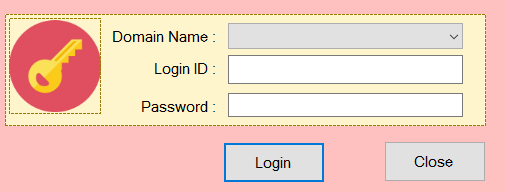
[Windows Forms] [VB.NET] 實現利用AD帳號登入Windows Form


我過去的設計都是走獨立SQL帳號密碼管理
但這次的需求是要利用走現有的AD認證,方便使用者不需要記多組帳號密碼


以下直接列出我的實作方式

1.先加入參考


2.直接開一個檔案為LdapAuthentication.vb
完整程式碼如下:

Imports System
Imports System.Text
Imports System.Collections
Imports System.DirectoryServices


Namespace FormsAuth
    Public Class LdapAuthentication

        Dim _path As String
        Dim _filterAttribute As String

        Public Sub New(ByVal path As String)
            _path = path
        End Sub

        Public Function IsAuthenticated(ByVal domain As String, ByVal username As String, ByVal pwd As String) As Boolean

            Dim domainAndUsername As String = domain & "\" & username
            Dim entry As DirectoryEntry = New DirectoryEntry(_path, domainAndUsername, pwd)

            Try
                'Bind to the native AdsObject to force authentication.
                Dim obj As Object = entry.NativeObject
                Dim search As DirectorySearcher = New DirectorySearcher(entry)

                search.Filter = "(SAMAccountName=" & username & ")"
                search.PropertiesToLoad.Add("cn")
                Dim result As SearchResult = search.FindOne()

                If (result Is Nothing) Then
                    Return False
                End If

                'Update the new path to the user in the directory.
                _path = result.Path
                _filterAttribute = CType(result.Properties("cn")(0), String)

            Catch ex As Exception
                Throw New Exception("Error authenticating user. " & ex.Message)
            End Try

            Return True
        End Function

        Public Function GetGroups() As String
            Dim search As DirectorySearcher = New DirectorySearcher(_path)
            search.Filter = "(cn=" & _filterAttribute & ")"
            search.PropertiesToLoad.Add("memberOf")
            Dim groupNames As StringBuilder = New StringBuilder()

            Try
                Dim result As SearchResult = search.FindOne()
                Dim propertyCount As Integer = result.Properties("memberOf").Count

                Dim dn As String
                Dim equalsIndex, commaIndex

                Dim propertyCounter As Integer

                For propertyCounter = 0 To propertyCount - 1
                    dn = CType(result.Properties("memberOf")(propertyCounter), String)

                    equalsIndex = dn.IndexOf("=", 1)
                    commaIndex = dn.IndexOf(",", 1)
                    If (equalsIndex = -1) Then
                        Return Nothing
                    End If

                    groupNames.Append(dn.Substring((equalsIndex + 1), (commaIndex - equalsIndex) - 1))
                    groupNames.Append("|")
                Next

            Catch ex As Exception
                Throw New Exception("Error obtaining group names. " & ex.Message)
            End Try

            Return groupNames.ToString()
        End Function
    End Class
End Namespace


3.Login按鈕

Sub Login_Click(sender as object,e as EventArgs) Handles btnLogin.Click

  Dim adPath as String = "LDAP://DC=..,DC=.." 'Path to your LDAP directory server

 'LDAP 輸入方式再請另外自己GOOGLE填寫方式

  Dim adAuth as LdapAuthentication = new LdapAuthentication(adPath)
  try
    if(true = adAuth.IsAuthenticated(txtDomain.Text, txtUsername.Text, txtPassword.Text)) then
      Dim groups as string = adAuth.GetGroups()

      'Create the ticket, and add the groups.
      Dim isCookiePersistent as boolean = chkPersist.Checked
      Dim authTicket as FormsAuthenticationTicket = new FormsAuthenticationTicket(1, _
           txtUsername.Text,DateTime.Now, DateTime.Now.AddMinutes(60), isCookiePersistent, groups)

      'Encrypt the ticket.
      Dim encryptedTicket as String = FormsAuthentication.Encrypt(authTicket)

      'Create a cookie, and then add the encrypted ticket to the cookie as data.
      Dim authCookie as HttpCookie = new HttpCookie(FormsAuthentication.FormsCookieName, encryptedTicket)

      if(isCookiePersistent = true) then
authCookie.Expires = authTicket.Expiration
      end if
      'Add the cookie to the outgoing cookies collection.
      Response.Cookies.Add(authCookie)

      'You can redirect now.
      Response.Redirect(FormsAuthentication.GetRedirectUrl(txtUsername.Text, false))
    
    else
      errorLabel.Text = "Authentication did not succeed. Check user name and password."
    end if

  catch ex as Exception
    errorLabel.Text = "Error authenticating. " & ex.Message
  end try
End sub


文章參考
 vb.net開發的login程式(win form),帳號要如何與AD帳號整合?
https://social.msdn.microsoft.com/Forums/zh-TW/5fe87afe-340a-41eb-bab4-a8707400a9a3/vbnetloginwin-formad?forum=232


如何使用表單驗證及 Visual Basic .NET 通過 Active Directory 驗證
https://support.microsoft.com/zh-tw/help/326340/how-to-authenticate-against-the-active-directory-by-using-forms-authen

2017年7月6日 星期四

[Windows Forms] [VB.NET] TEXTBOX 輸入限制 -只能輸入數字

'只能輸入數字
 If e.KeyChar = Chr(48) Or e.KeyChar = Chr(49) Or e.KeyChar = Chr(50) Or e.KeyChar = Chr(51) Or e.KeyChar = Chr(52) Or e.KeyChar = Chr(53) Or e.KeyChar = Chr(54) Or e.KeyChar = Chr(55) Or e.KeyChar = Chr(56) Or e.KeyChar = Chr(57) Or e.KeyChar = Chr(13) Or e.KeyChar = Chr(8) Then
 e.Handled = False
  Else
e.Handled = True
 End If

2017年5月23日 星期二

[Windows Forms] [VB.NET] TEXTBOX 輸入限制 -只能輸入字母

  Private Sub txtbox1_KeyPress(sender As Object, e As KeyPressEventArgs) Handles txtbox1.KeyPress
        '只能輸入字母
        If Char.IsLetter(e.KeyChar) = True Or Char.IsControl(e.KeyChar) = True Then
            e.Handled = False
        Else
            e.Handled = True
        End If
    End Sub