2017年8月25日 星期五

[Windows Forms] [VB.NET] 實現利用AD帳號登入Windows Form


我過去的設計都是走獨立SQL帳號密碼管理
但這次的需求是要利用走現有的AD認證,方便使用者不需要記多組帳號密碼
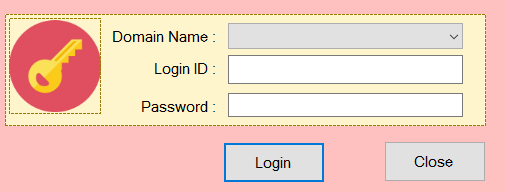


以下直接列出我的實作方式

1.先加入參考


2.直接開一個檔案為LdapAuthentication.vb
完整程式碼如下:

Imports System
Imports System.Text
Imports System.Collections
Imports System.DirectoryServices


Namespace FormsAuth
    Public Class LdapAuthentication

        Dim _path As String
        Dim _filterAttribute As String

        Public Sub New(ByVal path As String)
            _path = path
        End Sub

        Public Function IsAuthenticated(ByVal domain As String, ByVal username As String, ByVal pwd As String) As Boolean

            Dim domainAndUsername As String = domain & "\" & username
            Dim entry As DirectoryEntry = New DirectoryEntry(_path, domainAndUsername, pwd)

            Try
                'Bind to the native AdsObject to force authentication.
                Dim obj As Object = entry.NativeObject
                Dim search As DirectorySearcher = New DirectorySearcher(entry)

                search.Filter = "(SAMAccountName=" & username & ")"
                search.PropertiesToLoad.Add("cn")
                Dim result As SearchResult = search.FindOne()

                If (result Is Nothing) Then
                    Return False
                End If

                'Update the new path to the user in the directory.
                _path = result.Path
                _filterAttribute = CType(result.Properties("cn")(0), String)

            Catch ex As Exception
                Throw New Exception("Error authenticating user. " & ex.Message)
            End Try

            Return True
        End Function

        Public Function GetGroups() As String
            Dim search As DirectorySearcher = New DirectorySearcher(_path)
            search.Filter = "(cn=" & _filterAttribute & ")"
            search.PropertiesToLoad.Add("memberOf")
            Dim groupNames As StringBuilder = New StringBuilder()

            Try
                Dim result As SearchResult = search.FindOne()
                Dim propertyCount As Integer = result.Properties("memberOf").Count

                Dim dn As String
                Dim equalsIndex, commaIndex

                Dim propertyCounter As Integer

                For propertyCounter = 0 To propertyCount - 1
                    dn = CType(result.Properties("memberOf")(propertyCounter), String)

                    equalsIndex = dn.IndexOf("=", 1)
                    commaIndex = dn.IndexOf(",", 1)
                    If (equalsIndex = -1) Then
                        Return Nothing
                    End If

                    groupNames.Append(dn.Substring((equalsIndex + 1), (commaIndex - equalsIndex) - 1))
                    groupNames.Append("|")
                Next

            Catch ex As Exception
                Throw New Exception("Error obtaining group names. " & ex.Message)
            End Try

            Return groupNames.ToString()
        End Function
    End Class
End Namespace


3.Login按鈕

Sub Login_Click(sender as object,e as EventArgs) Handles btnLogin.Click

  Dim adPath as String = "LDAP://DC=..,DC=.." 'Path to your LDAP directory server

 'LDAP 輸入方式再請另外自己GOOGLE填寫方式

  Dim adAuth as LdapAuthentication = new LdapAuthentication(adPath)
  try
    if(true = adAuth.IsAuthenticated(txtDomain.Text, txtUsername.Text, txtPassword.Text)) then
      Dim groups as string = adAuth.GetGroups()

      'Create the ticket, and add the groups.
      Dim isCookiePersistent as boolean = chkPersist.Checked
      Dim authTicket as FormsAuthenticationTicket = new FormsAuthenticationTicket(1, _
           txtUsername.Text,DateTime.Now, DateTime.Now.AddMinutes(60), isCookiePersistent, groups)

      'Encrypt the ticket.
      Dim encryptedTicket as String = FormsAuthentication.Encrypt(authTicket)

      'Create a cookie, and then add the encrypted ticket to the cookie as data.
      Dim authCookie as HttpCookie = new HttpCookie(FormsAuthentication.FormsCookieName, encryptedTicket)

      if(isCookiePersistent = true) then
authCookie.Expires = authTicket.Expiration
      end if
      'Add the cookie to the outgoing cookies collection.
      Response.Cookies.Add(authCookie)

      'You can redirect now.
      Response.Redirect(FormsAuthentication.GetRedirectUrl(txtUsername.Text, false))
    
    else
      errorLabel.Text = "Authentication did not succeed. Check user name and password."
    end if

  catch ex as Exception
    errorLabel.Text = "Error authenticating. " & ex.Message
  end try
End sub


文章參考
 vb.net開發的login程式(win form),帳號要如何與AD帳號整合?
https://social.msdn.microsoft.com/Forums/zh-TW/5fe87afe-340a-41eb-bab4-a8707400a9a3/vbnetloginwin-formad?forum=232


如何使用表單驗證及 Visual Basic .NET 通過 Active Directory 驗證
https://support.microsoft.com/zh-tw/help/326340/how-to-authenticate-against-the-active-directory-by-using-forms-authen

2017年7月27日 星期四

[VB.Net] 程式自動建立捷徑到桌面上


If (Not File.Exists(String.Format("{0}\程式.lnk", My.Computer.FileSystem.SpecialDirectories.Desktop))) Then '檢查桌面
CreateShortCut("檔案位置", "程式.exe", "描述") '產生捷徑
End If


Sub CreateShortCut(ByRef strFolder As String, ByRef strExe As String, ByRef strName As String)
Dim sc, objWS As Object
objWS = CreateObject("WScript.Shell")
With objWS
sc = .CreateShortCut(.SpecialFolders("Desktop") & "\" & Replace(strExe, ".EXE", ".LNK", 1, , 1))
End With
With sc
.TargetPath = objWS.ExpandEnvironmentStrings(strFolder & "\" & strExe)
.WorkingDirectory = strFolder
.Description = strName
.WindowStyle = 4
.IconLocation = objWS.ExpandEnvironmentStrings(strFolder & "\" & strExe & ",0")
.Save()
End With
End Sub

2017年7月6日 星期四

[WINDOWS 10] [English Version]將預設輸入法切換改為 Ctrl + Shift


從控制台進入到語言設定
> Control Panel\Clock, Language, and Region\Language


從左側選擇進階選項
找到更換語言快速鍵


把切換輸入法改為Ctrl+Shift


OK囉!!

[設計好物]CANVA


推薦網站:https://www.canva.com/


這是線上免費設計卡片或者是一些平面小宣傳廣告用的(例如:Facebook)

裡面有些基本設計或者是收費的設計

最好用的地方是你可以自由設計後轉成圖片檔或者是PDF

轉出後的PDF還可以直接使用Illustrator去修改成自己需要的尺寸

而且在Illustrator中使用,每個頁面都是獨立的物件還可以做更廣泛的應用

真的是無敵好用!!!強力推薦 👍

[Windows Forms] [VB.NET] TEXTBOX 輸入限制 -只能輸入數字

'只能輸入數字
 If e.KeyChar = Chr(48) Or e.KeyChar = Chr(49) Or e.KeyChar = Chr(50) Or e.KeyChar = Chr(51) Or e.KeyChar = Chr(52) Or e.KeyChar = Chr(53) Or e.KeyChar = Chr(54) Or e.KeyChar = Chr(55) Or e.KeyChar = Chr(56) Or e.KeyChar = Chr(57) Or e.KeyChar = Chr(13) Or e.KeyChar = Chr(8) Then
 e.Handled = False
  Else
e.Handled = True
 End If

2017年6月5日 星期一

[Windows Forms] [VB.NET] 取得日期 資料處理

'Get the first day of the month
'取得當月的第一天 Public Function FirstDayOfMonth(ByVal sourceDate As DateTime) As DateTime
  Return New DateTime(sourceDate.Year, sourceDate.Month, 1)
End Function


'Get the last day of the month
'取得當月的最後一天 Public Function LastDayOfMonth(ByVal sourceDate As DateTime) As DateTime
  Dim lastDay As DateTime = New DateTime(sourceDate.Year, sourceDate.Month, 1)
  Return lastDay.AddMonths(1).AddDays(-1)
End Function


'根據日期取得上個月的最後一天
Public Shared Function LastDayOfLastMonth(ByVal sourceDate As DateTime) As DateTime
        Dim lastDay As DateTime = New DateTime(sourceDate.Year, sourceDate.Month, 1)
        Return lastDay.AddMonths(0).AddDays(-1)
End Function


'根據日期取得下個月的第一天
Public Shared Function FirstDayOfNextMonth(ByVal sourceDate As DateTime) As DateTime
        Dim NextDay As DateTime = New DateTime(sourceDate.Year, sourceDate.Month, 1)
        Return NextDay.AddMonths(1).AddDays(0)

End Function

2017年5月23日 星期二

[Windows Forms] [VB.NET] TEXTBOX 輸入限制 -只能輸入字母

  Private Sub txtbox1_KeyPress(sender As Object, e As KeyPressEventArgs) Handles txtbox1.KeyPress
        '只能輸入字母
        If Char.IsLetter(e.KeyChar) = True Or Char.IsControl(e.KeyChar) = True Then
            e.Handled = False
        Else
            e.Handled = True
        End If
    End Sub